MiniMax H3 cache nodes, measured on one RTX 3060
Eight ComfyUI cache nodes promise to make MiniMax H3 faster, and every published figure comes from a different card and a different canvas. This page installs all eight on the same machine and measures what survives.
What we tested and how
Conditions for every figure on this page: physical GPU 0 was an RTX 3060 12GB; Proxmox VE VM 100 had 16 vCPU, 47.05 GiB RAM and no swap; ComfyUI 0.31.0 used PyTorch 2.13.0+cu130; the official R2V template loaded Ref2VA pruned INT8 at 864×480 for 124 frames at 24fps, 20 steps, res_, simple, denoise 1, with the seed fixed at 20260814; Turbo LoRA and SageAttention were not enabled.
Only one cache node was installed at a time. After each node the directory was deleted and the container restarted, because several of these nodes patch model methods and a stale patch would carry into the next measurement. The ComfyUI core file list, 284 Python files, was re-checked after every round and never changed.
| Baseline run | Wall time | Peak VRAM | Peak system RAM |
|---|---|---|---|
| Baseline runRun A | Wall time596.9 s | Peak VRAM11,433 MiB | Peak system RAM43,488 MiB |
| Baseline runRun B | Wall time597.0 s | Peak VRAM11,679 MiB | Peak system RAM43,546 MiB |
| Baseline runRun C, after a config change | Wall time597.2 s | Peak VRAM11,305 MiB | Peak system RAM43,626 MiB |
Three baseline runs landed within 0.3 seconds of each other and produced identical video data. Every speed-up on this page is measured against 597.0 seconds.
How to tell a cache node is actually working
A cache node can install cleanly, appear in the menu, and do nothing. There is a way to catch that, and it costs one extra run.
Run the same workflow twice with a fixed seed and no cache node, and confirm both runs produce the same video data. Then add the cache node and compare again. Caching works by skipping part of the computation, so it must change the numbers. If the video data is unchanged, the node is loaded but is not touching the computation, whatever its description claims.
Compare the video data, not the whole file. ComfyUI writes the output filename prefix into the MP4 metadata, so two identical runs saved under different names produce different file checksums. Our two baseline runs had byte-identical video data and identical file sizes, yet different whole-file checksums, with the first difference at byte 9090 inside the metadata. Comparing whole files would have marked every node on this page as working.
The practical form of the check: extract the mdat box, which holds the encoded frames, and hash that. Or give every run the same output prefix and let ComfyUI number the files. Both work; the first one can be re-checked afterwards on files you have already saved.
Install results
All eight were cloned, loaded and checked against the running / list. Seven registered nodes. The names below are the registered API names, which are frequently not the names in the README.
| Repository | Commit | Registered node | Loads |
|---|---|---|---|
RepositoryHELPMEEADICE/ | Commitc1dacf47 | Registered nodeTESpeedMiniMaxH3 | LoadsYes, patch step failed |
Repositoryduckyshell/ | Commit725973c3 | Registered nodeApplyMiniMaxH3FirstBlockCache | LoadsYes |
Repositorylihaoyun6/ | Commit8a45e096 | Registered nodeMiniMaxH3Cache | LoadsYes |
RepositoryIcyoung/ | Commit4cbb50d6 | Registered nodeMiniMaxH3TeaCache | LoadsYes |
Repositorylinjian- | Commit2f507d68 | Registered nodeMiniMaxH3SpeedCache | LoadsYes |
Repositorysignerzwb/ | Commita19b53c4 | Registered nodeH3CombinedAcceleration and three more | LoadsYes |
RepositoryFFFFFFpy/ | Commitdc350656 | Registered nodeMiniMaxH3AdaptiveCache and one more | LoadsYes |
Repositoryzbm2024/ | Commite8b6549b | Registered nodeNone | LoadsNo |
The last repository fails with ModuleNotFoundError. It ships its logic as nodes, a compiled Windows extension, and this test machine runs Linux.
None of the eight repositories contains a requirements, so no packages were installed, upgraded or downgraded at any point. The Python environment was byte-identical before and after all eight.
Measured results
| Node | Wall time | Speed-up | Verdict | Peak VRAM | Peak RAM |
|---|---|---|---|---|---|
| NodeNo cache node (baseline) | Wall time597.0 s | Speed-up1.000× | VerdictReference | Peak VRAM11,679 MiB | Peak RAM43,546 MiB |
NodeMiniMaxH3TeaCache | Wall time308.2 s / 308.6 s | Speed-up1.937× / 1.935× | VerdictWorking | Peak VRAM11,647 MiB | Peak RAM43,466 MiB |
NodeApplyMiniMaxH3FirstBlockCache | Wall time363.2 s | Speed-up1.644× | VerdictWorking | Peak VRAM11,601 MiB | Peak RAM43,474 MiB |
NodeMiniMaxH3AdaptiveCache | Wall time377.7 s | Speed-up1.581× | VerdictWorking | Peak VRAM11,201 MiB | Peak RAM42,642 MiB |
NodeH3CombinedAcceleration | Wall time447.0 s | Speed-up1.336× | VerdictWorking | Peak VRAM11,773 MiB | Peak RAM42,060 MiB |
NodeTESpeedMiniMaxH3 | Wall time597.5 s | Speed-up0.999× | VerdictChanges output, saves nothing | Peak VRAM11,337 MiB | Peak RAM43,523 MiB |
NodeMiniMaxH3SpeedCache | Wall timeCrashed at 50 s | Speed-up— | VerdictFailed | Peak VRAM11,163 MiB | Peak RAM41,338 MiB |
TeaCache was run twice because its repository is the only one publishing a specific multiplier. Both raw values are shown; we do not average them into a single tidier number. The two runs produced identical video data.
Peak VRAM stayed between 11,163 and 11,773 MiB across every node, against 12,288 MiB on the card. None of these nodes buys VRAM headroom. They trade computation for time, not for memory, so a workflow that does not fit today will still not fit with a cache node attached. The VRAM guide covers what actually moves that number.
Two results deserve attention. TESpeedMiniMaxH3 changed the video data yet finished in 597.5 seconds, half a second slower than running nothing. Its install step needs to modify a ComfyUI core file, that write failed on this machine, and the node still loaded and still altered the output. Looking only at "the output changed" would have scored it as working. MiniMaxH3SpeedCache crashed with AttributeError: module 'comfy; its author documents testing on ComfyUI 0.30.0, and this machine runs 0.31.0.
Why the published numbers cannot be compared
Every one of these projects publishes its own figure, and no two were measured on the same hardware or the same canvas. Setting the claims beside one set of same-machine measurements:
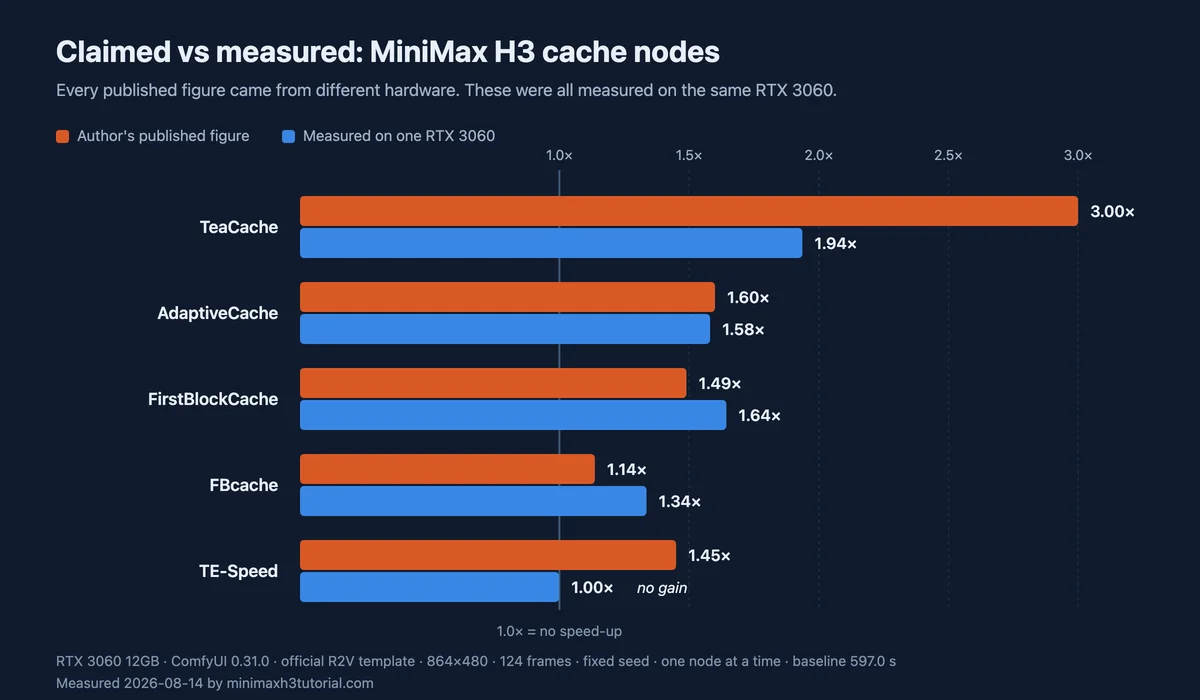
Where a project published two figures, the higher one is charted: FirstBlockCache states 1.49× and 1.44×, and 1.49× is shown. The FBcache figure of 13.7% end to end is charted as 1.137×. Every measured bar comes from the run table above.
| Node | Author's figure | Author's hardware | Measured here on one RTX 3060 |
|---|---|---|---|
NodeMiniMaxH3TeaCache | Author's figure3.0× | Author's hardwareCMP 170HX, 64GB modified mining card | Measured here on one RTX 30601.937× / 1.935× |
NodeMiniMaxH3AdaptiveCache | Author's figure1.60× | Author's hardwareRTX 5090 | Measured here on one RTX 30601.581× |
NodeApplyMiniMaxH3FirstBlockCache | Author's figure1.49× / 1.44× | Author's hardwareRTX 5090 | Measured here on one RTX 30601.644× |
NodeH3CombinedAcceleration | Author's figure13.7% end to end | Author's hardwareRTX 3090 24GB | Measured here on one RTX 30601.336× |
NodeTESpeedMiniMaxH3 | Author's figureabout 45% | Author's hardwareNot stated | Measured here on one RTX 30600.999× |
The pattern is not simply that the published figures are inflated. Two nodes measured faster here than their authors reported, and AdaptiveCache landed within two percent of its stated figure. One measured about two thirds of its claim, and one delivered nothing. The problem was never honesty. It is that a number from a 5090 and a number from a modified mining card answer different questions, and neither answers the one a 3060 owner is asking.
One repository makes the incomparability explicit: TeaCache's README markets itself against TE-Speed by putting its own 66% figure, measured on that modified mining card, next to TE-Speed's 45% figure, measured on hardware that is never named.
Maintenance status
Stars measure attention at launch. They do not measure whether anyone is still maintaining the code.
| Repository | Stars | Last push | License |
|---|---|---|---|
RepositoryHELPMEEADICE/ | Stars235 | Last push08-03, the day it was created | LicenseLGPL-3.0 |
Repositoryduckyshell/ | Stars77 | Last push08-07 | LicenseMIT |
Repositorylihaoyun6/ | Stars75 | Last push08-03, the day it was created | LicenseGPL-3.0 |
RepositoryIcyoung/ | Stars11 | Last push08-04, the day after | LicenseMIT |
Repositorylinjian- | Stars6 | Last push08-09 | LicenseGPL-3.0 |
Repositorysignerzwb/ | Stars4 | Last push08-06 | LicenseNone |
RepositoryFFFFFFpy/ | Stars4 | Last push08-07 | LicenseGPL-3.0 |
Repositoryzbm2024/ | Stars2 | Last push08-11 | LicenseNone |
Repository metadata checked 2026-08-14 via the GitHub API. These fields move quickly; re-check them before relying on any row.
The most-starred project here, with 235 stars, has not been pushed since the day it was published, and it is the one that saved no time in our measurements. The 11-star project was the fastest.
What the docs do not tell you
Two repositories were excluded from timing because their documentation does not establish how to connect them. lihaoyun6/ says only that it is used the way EasyCache is used, with no node name, no parameters and no wiring diagram. zbm2024/ does not describe connection at all, and it does not load on Linux in any case. Guessing at the wiring and publishing the resulting number would produce a figure nobody could check.
That second repository is also worth a closer look before installation. It distributes a compiled nodes binary of 322,048 bytes where the comparable project ships 14,124 bytes of readable Python. A compiled binary cannot be audited, .pyd files generally run only on Windows, and this repository carries no license. Those are three separate facts about what you would be installing.
One more thing surfaced during testing and does not appear in any README. lihaoyun6/ describes itself as patching ComfyUI core files. It does not write to any file; it replaces two model methods in memory the moment the module is imported. That means it takes effect as soon as the folder is present, whether or not you connect it to anything, and deleting the folder without restarting ComfyUI leaves the replacement live.
The wiring mistake that looks like a broken node
Six of these nodes take a MODEL input and return a MODEL output, and that output has to reach two places: the scheduler and the guider. Connecting only one of them is the easiest error to make, and it produces a node that loads correctly, shows no error, and does nothing.
It also looks exactly like a node that does not work. Before concluding a cache node is broken, confirm both connections exist, then apply the check described above. If the video data is identical with the node connected, the cache genuinely did not run. If you find one connection missing, that was the cause. The troubleshooting guide covers the other failure shapes.
What you are allowed to do with these
Two of the eight repositories, signerzwb/ and zbm2024/, carry no license file at all. Without a license, default copyright applies and you have no granted permission to use, modify or redistribute the code, whatever the README invites you to do. For personal experimentation that may not concern you. For anything commercial it should.
Of the rest, two are MIT, three are GPL-3.0 or LGPL-3.0. If you are packaging a workflow for other people, the copyleft terms in the GPL family apply to what you distribute, and that is worth reading before you build a product around one of these.
These two are not cache nodes
Two projects appear in the same searches and work differently. shuaixn/ is a sampler built for the dual audio and video schedule used with Turbo LoRA. aaalll12322/ trades numerical stability for speed, which is a precision decision rather than a caching one. Neither skips computation the way the nodes above do, so neither belongs in the comparison, and the check on this page does not apply to them unchanged. The other acceleration lever, the distilled Turbo LoRA family, has its own measured A/B on the Turbo LoRA page.
Frequently asked questions
Conditions for every measured figure below: physical GPU 0 was an RTX 3060 12GB; ComfyUI 0.31.0 used PyTorch 2.13.0+cu130; the official R2V template loaded Ref2VA pruned INT8 at 864×480 for 124 frames with the seed fixed at 20260814; one cache node was installed at a time; Turbo LoRA and SageAttention were not enabled.
Do MiniMax H3 cache nodes actually speed up generation?
Four of the eight did on our test machine. TeaCache measured 1.937x, FirstBlockCache 1.644x, AdaptiveCache 1.581x and the FBcache node 1.336x against a 597.0 second baseline. One node changed the output but saved no time at all, one crashed, one shipped a Windows binary that would not import, and one had documentation too thin to wire up.
How can I tell whether a cache node is really working?
Run the same workflow twice with a fixed seed and no cache node, and confirm both runs produce the same video data. Then add the cache node and compare again. Caching works by skipping part of the computation, so it must change the numbers. If the video data is unchanged, the node is loaded but is not touching the computation, whatever its description claims.
Which MiniMax H3 cache node should I install?
On the configuration measured here, TeaCache was the fastest and AdaptiveCache and FirstBlockCache were close behind. Speed is not the only criterion: two of the eight repositories ship no license at all, and three had not been updated since the day they were published. Check the license and the maintenance status before you commit to one.